Gnet D-Force S1 4CH Wifi GPS Cloud 128gb dashcam
- VendorGnet
Gnet D-Force S1 4CH Wifi GPS Cloud 128gb dashcam
- VendorGnet
€1.015,51
- 60-day trial & free returns
- The dashcam expert since 2013
- Free buyer protection up to €500
- 4.6 stars from 2300+ reviews
€1.015,51


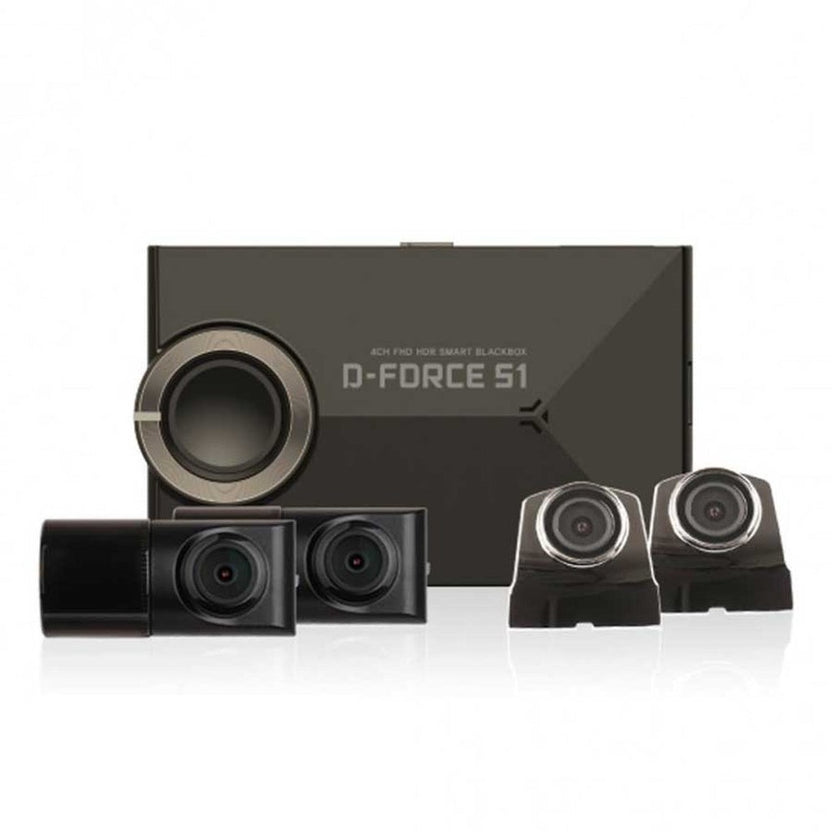
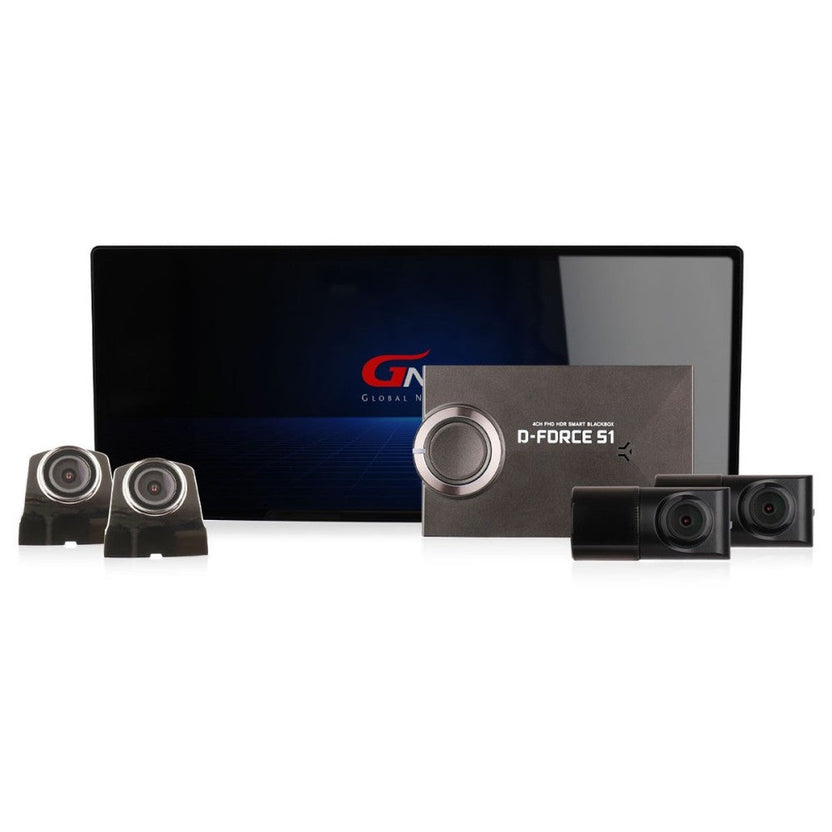
The Gnet D-Force S1 is one of the most comprehensive and advanced dashcams on the market. This camera films fully 360 degrees around any vehicle. The large 12.3-inch LCD screen controls the dashcam and via Cloud you receive live notifications of everything happening around your car.
The large included 12.3-inch touchscreen monitor thus shows all videos live. Especially for trucks or vans, the monitor can come in handy as an extra safeguard for blind spots. On the screen, you also easily control the menu to change settings.
The best thing about this Gnet D-Force S1 4CH is the ability to connect to the dashcam from anywhere in the world. You can connect the Gnet D-Force S1 4CH to the internet via an in-car Wi-Fi hotspot. Via the WithCloud app, you can then watch live from the dashcam and receive notifications of events. This allows you to always keep an eye on your car, wherever you are.
With the optional SIM Wi-Fi adapter (see accessories), you can easily create a Wi-Fi hotspot in the car. Simply connect the SIM adapter to the dashcam where the Wifi adapter is located. You then simply connect the Gnet D-Force S1 4CH to the Wifi network via the App so that the dashcam is connected to the internet.
Accessible via the App or PC, the WithCloud system is a comprehensive Fleet management system with the following options:
- Live streaming of images
- Live GPS tracking
- Parking mode notifications
- Driver reports (driving time, behaviour etc.)
- Geo-fencing (virtual location Barrier)
The free WithCloud account allows unlimited Live remote viewing and has 2GB of Cloud storage. You can also watch back up to 10 minutes of saved footage, footage is stored for up to 2 days. For unlimited access and more storage, paid subscriptions are available from $10 per month.
The Gnet D-Force S1 4CH is equipped with Wifi to allow images within about 10 metres to be viewed on the phone. Images can be viewed and downloaded via the freely available app, eliminating the need to remove the SD card from the camera. By viewing the files via Wifi instead of the Cloud, you do not lose any data via the SIM card.
The Gnet D-Force S1 4CH comes with an external GPS receiver. This GPS module allows the speed to be displayed on screen and also keeps track of the coordinates of the places filmed. This allows you to later use the supplied software to see exactly where certain recordings were made.
The Gnet D-Force S1 4CH has a convenient automatic Time Lapse parking mode function to secure the car when parked. In this Time Lapse mode, the camera takes two photos every second and this is later played back as accelerated video. In case of an impact, a normal video will be started so you can be sure that all the details of the incident are visible. In case of an impact during parking mode, you will receive a notification the moment you start the car. This allows you to secure the relevant video file.
Due to the Time Lapse mode, the videos do not take up too much space and can therefore be recorded for a very long time without filling up the SD card. Combined with the supplied Hardwire kit, parking mode automatically switches on when the car ignition is turned off and normal recording starts again when the car is started.
To use parking mode, the dashcam must be connected with the supplied Continuous power supply. As a result, the Gnet D-Force S1 4CH dashcam has a built-in low voltage cut-off system. Because of this system, the dashcam senses when the car battery is about to run down and, in that case, immediately switches off the camera. So you don't have to worry about ending up with a dead battery. The voltage can be set via the App or PC viewer to 11.3/11.5/11.8/12.0/12.3V. If the dashcam is switched off during parking mode due to low-voltage protection, you will receive a notification the moment you start the car. This lets you know that not the entire parking session has been captured.
The ADAS 2.0 system on this Gnet D-Force S1 4CH is a built-in ‘Advanced Driver Assistant System’. This system supports the driver while driving in three ways:
FCWS: ‘Forward Collision Warning System’. This system issues a warning when approaching a vehicle in front at high speed. The system alerts, for example, when there is a traffic jam in front of the car. With a good GPS signal, the current speed is known and the camera can make a good estimate of the situation around the car.
LDWS: ‘Lane Departure Warning System’. When the car is in danger of changing lanes on the motorway, the camera can give a signal.
FVSA: ‘Forward Vehicle Start Alarm’. Do you also sometimes fail to pay attention when standing at traffic lights? This system gives a warning when a vehicle ahead starts to move away, for example at a traffic light or in a traffic jam.
*The ADAS system works better in some locations than others depending on the type of (highway) road. On narrow roads, for example, the LDWS system can sound an alarm faster than on wide roads. Our personal experience is that on European roads, the system often issues an alert too quickly, so it can sometimes be perceived as a nuisance.
The Gnet D-Force S1 4CH supports MicroSD cards of up to 512gb. It comes with a 128gb Micro SD card as standard, this is good for around 6 hours of FullHD recording for all cameras.
As an alternative to the hardwire kit supplied as standard, it is also possible to connect the D-Force S1 4CH with the Plug&Play OBD plug. You simply plug the connector into the car's OBD input and, once connected, the D-Force S1 4CH automatically switches on and off in parking mode when you turn the car's ignition on and off.
It is also possible to use the optionally available cigarette power supply for easier installation. With this, the dashcam will automatically switch on and off with the car ignition. Please note that parking mode using the cigarette power supply will therefore no longer work.
If you do not want to connect the dashcam to the car's fuse box but still want to use the parking mode, it is best to use the OBD power supply mentioned above or a Cobalt powerbank (see accessories). This allows you to easily power the dashcam when the car is parked.
This Gnet D-Force S1 4CH has a 140-degree wide-angle lens on all cameras. This captures a large area around the car without distorting the image too much.
This Gnet D-Force S1 4CH stores the super sharp video footage on the SD card with the latest H.265 HEVC (High Efficiency Video Coding). In short, this means that the dashcam uses less memory than other FullHD dashcams. So the files are of the best quality but don't take up too much memory on the MicroSD card.
Thanks to the built-in G-sensor, the dashcam notices when you have had an accident. Upon impact, images are automatically saved securely so they are not lost. They can no longer be overwritten or deleted via the dashcam.
The Gnet D-Force S1 4CH has a built-in microphone so that sound is also recorded. The microphone can also be switched off if required.
The current time and date are always displayed on screen so that the time at which the relevant recordings were made can be shown later.
Found the right dashcam?
Our product finder finds the dashcam that suits you and your car in just a few questions.
Installing your dashcam yourself?
You can often install a dashcam yourself in around 1 to 1.5 hours. A standard cigarette-lighter installation usually requires no tools.
To get the most out of your dashcam
Quickly connect your dashcam to permanent power with this Plug & Play OBD power supply…
100Wh power bank for using parking mode without draining your car battery. Note: you need…
Expand your storage further. 512GB holds around 48 hours of 4K footage.
Expand your storage further. 256GB holds around 24 hours of 4K footage.
A larger SD card lets you store more videos. 128GB holds around 12 hours of…
5.0 /5
Rating
Translated from: Dutch
| Image | |
|---|---|
The number of cameras or “channels” the dashcam uses to film. A 1-channel 1CH dashcam films only the front and a 2CH also has a rear camera. A 3CH has an additional interior camera and a 4CH dashcam often consists of four separate cameras.
|
4CH
|
Video resolution indicates how many pixels the videos consist of. Therefore, the higher the resolution, the larger the videos are and the more details can be seen. For example, 4K refers to the number of horizontal pixels (3840) of the video.
|
Full HD
|
The quality of video at night or in low light conditions is mainly determined by the image sensor used in the dashcam. Some dashcams also have infrared LEDs, but these are mainly effective at short distances for interior cameras, for example.
|
|
Dashcams always have a round “fish eye” lens with a wide viewing angle so that a larger area around the camera is recorded. So a wider viewing angle means you capture more but also results in some distortion at the sides.
|
|
The image sensor used determines the resolution of the videos and is the biggest determinant of dashcam image quality.
|
|
The chip or processor is basically the computer or brain of the dashcam. It converts the images into digital video files (usually MP4 or AVI). Along with the image sensor, it is a major determinant of the quality of the final videos.
|
|
| Functions | |
Wifi allows you to view images on your phone or tablet within range of the camera (5 to 10 meters) without having to remove the SD card from the dashcam.
|
|
A dashcam with GPS records the current speed and location while filming. The speed can be displayed at the bottom of each video, this can be useful in determining the question of fault in an accident.
|
|
A dashcam with parking mode secures your car when it is parked. To use parking mode, the dashcam must be connected with a permanent power cable at the car's fuse box or to a Powerbank (see accessories).
|
|
In parking mode, a dashcam films in a way that consumes less data and power such as in Time lapse (1 picture per second), motion detection or vibration detection. The dashcam automatically switches to this mode when you turn off the car's ignition.
|
Vibration detection and Time lapse
|
A dashcam with Cloud allows you to watch live and receive notifications of (parking) events anywhere in the world. To use Cloud, you need a SIM card with internet connection and sometimes a (paid) user account.
|
|
Loop recording allows the dashcam to keep recording continuously with a full SD card. When the SD card is full it automatically overwrites the oldest videos so that always the last trips are stored on the SD card.
|
|
The G-sensor in a dashcam records vibrations and therefore notices when a collision or incident occurs. In that case, the current recording is stored separately and securely so that it cannot be overwritten by the Loop recording.
|
|
Advanced Driver Assistant System that can warn of dangerous situations such as a rapidly approaching predecessor or undetected lane changes. Be aware that this system is never 100% reliable and due to limited input is not always effective.
|
|
| Device | |
An LCD screen makes it easy to adjust the dashcam, operate the menu and view live and saved videos. With most dashcams, the LCD screen turns off after a few minutes of driving so it is not distracting to the driver.
|
|
|
|
|
A dashcam with touchscreen LCD screen you operate by using your fingers on the screen like on your smartphone. A dashcam without a touchscreen is operated with buttons.
|
|
A dashcam is mounted on the windshield with a suction cup or adhesive mount. Suction cup mounts are easier to remove but slightly less durable, while adhesive mounts are sturdier and more durable but more difficult to remove.
|
Adhesive
|
The type of plug used to power the dashcam. Can be useful if you want to switch to another model of dashcam without having to reinstall the entire power supply.
|
|
A CPL filter acts like Polaroid sunglasses in front of the lens and can prevent harmful or annoying reflections. Keep in mind that it is better to remove the CPL filter at night because otherwise the videos may become too dark.
|
|
The way videos are stored in the dashcam. Most dashcams use a Micro SD card, others have built-in eMMC memory. Preferably use a new and fast SD card from a well-known brand to avoid failures.
|
|
With a Micro SD card, the storage capacity - depending on the dashcam model - can be expanded to 128gb, 256gb or even 512gb. Up to about 24 hours of FullHD or 12 hours of 4K video can be stored on a 128gb SD card.
|
32gb, 64gb, 128gb, 256gb, and 512gb
|
A microphone also records sound with the videos. Most dash cams allow you to turn off the microphone with the push of a button.
|
|
A dashcam is equipped with a Li-ion battery or capacitor (Super capacitor). The batteries are very small and only intended to be able to turn off the dashcam if the power fails. Therefore, a dashcam must always be connected to the power supply.
|
|
The voltage at which the dashcam can be used. Most dashcams are compatible with all cars and trucks with 12V and 24V. Always use the original included power supply or optional hardwire kit.
|
12V and 24V
|
|
650 g
|
|
|
|
|
| General | |
|
Gnet
|
|
|
€1.015,51 |
|
|
|
|
|
8809563331567
|
|
| Contents | |
|
|
|
Also active when your car is parked
Gnet D-Force S1 4CH Wifi GPS Cloud 128gb dashcam€1.015,51
€1.015,51
Order today, delivered tomorrow
Out of stock
| Image | |
|---|---|
The number of cameras or “channels” the dashcam uses to film. A 1-channel 1CH dashcam films only the front and a 2CH also has a rear camera. A 3CH has an additional interior camera and a 4CH dashcam often consists of four separate cameras.
|
4CH
|
Video resolution indicates how many pixels the videos consist of. Therefore, the higher the resolution, the larger the videos are and the more details can be seen. For example, 4K refers to the number of horizontal pixels (3840) of the video.
|
Full HD
|
The quality of video at night or in low light conditions is mainly determined by the image sensor used in the dashcam. Some dashcams also have infrared LEDs, but these are mainly effective at short distances for interior cameras, for example.
|
|
Dashcams always have a round “fish eye” lens with a wide viewing angle so that a larger area around the camera is recorded. So a wider viewing angle means you capture more but also results in some distortion at the sides.
|
|
The image sensor used determines the resolution of the videos and is the biggest determinant of dashcam image quality.
|
|
The chip or processor is basically the computer or brain of the dashcam. It converts the images into digital video files (usually MP4 or AVI). Along with the image sensor, it is a major determinant of the quality of the final videos.
|
|
| Functions | |
Wifi allows you to view images on your phone or tablet within range of the camera (5 to 10 meters) without having to remove the SD card from the dashcam.
|
|
A dashcam with GPS records the current speed and location while filming. The speed can be displayed at the bottom of each video, this can be useful in determining the question of fault in an accident.
|
|
A dashcam with parking mode secures your car when it is parked. To use parking mode, the dashcam must be connected with a permanent power cable at the car's fuse box or to a Powerbank (see accessories).
|
|
In parking mode, a dashcam films in a way that consumes less data and power such as in Time lapse (1 picture per second), motion detection or vibration detection. The dashcam automatically switches to this mode when you turn off the car's ignition.
|
Vibration detection and Time lapse
|
A dashcam with Cloud allows you to watch live and receive notifications of (parking) events anywhere in the world. To use Cloud, you need a SIM card with internet connection and sometimes a (paid) user account.
|
|
Loop recording allows the dashcam to keep recording continuously with a full SD card. When the SD card is full it automatically overwrites the oldest videos so that always the last trips are stored on the SD card.
|
|
The G-sensor in a dashcam records vibrations and therefore notices when a collision or incident occurs. In that case, the current recording is stored separately and securely so that it cannot be overwritten by the Loop recording.
|
|
Advanced Driver Assistant System that can warn of dangerous situations such as a rapidly approaching predecessor or undetected lane changes. Be aware that this system is never 100% reliable and due to limited input is not always effective.
|
|
| Device | |
An LCD screen makes it easy to adjust the dashcam, operate the menu and view live and saved videos. With most dashcams, the LCD screen turns off after a few minutes of driving so it is not distracting to the driver.
|
|
|
| |
A dashcam with touchscreen LCD screen you operate by using your fingers on the screen like on your smartphone. A dashcam without a touchscreen is operated with buttons.
|
|
A dashcam is mounted on the windshield with a suction cup or adhesive mount. Suction cup mounts are easier to remove but slightly less durable, while adhesive mounts are sturdier and more durable but more difficult to remove.
|
Adhesive
|
The type of plug used to power the dashcam. Can be useful if you want to switch to another model of dashcam without having to reinstall the entire power supply.
|
|
A CPL filter acts like Polaroid sunglasses in front of the lens and can prevent harmful or annoying reflections. Keep in mind that it is better to remove the CPL filter at night because otherwise the videos may become too dark.
|
|
The way videos are stored in the dashcam. Most dashcams use a Micro SD card, others have built-in eMMC memory. Preferably use a new and fast SD card from a well-known brand to avoid failures.
|
|
With a Micro SD card, the storage capacity - depending on the dashcam model - can be expanded to 128gb, 256gb or even 512gb. Up to about 24 hours of FullHD or 12 hours of 4K video can be stored on a 128gb SD card.
|
32gb, 64gb, 128gb, 256gb, and 512gb
|
A microphone also records sound with the videos. Most dash cams allow you to turn off the microphone with the push of a button.
|
|
A dashcam is equipped with a Li-ion battery or capacitor (Super capacitor). The batteries are very small and only intended to be able to turn off the dashcam if the power fails. Therefore, a dashcam must always be connected to the power supply.
|
|
The voltage at which the dashcam can be used. Most dashcams are compatible with all cars and trucks with 12V and 24V. Always use the original included power supply or optional hardwire kit.
|
12V and 24V
|
|
650 g
| |
|
| |
| General | |
|
Gnet
| |
|
€1.015,51 | |
| Contents | |
|
| |