Wolfbox i05 4K Wifi GPS 2CH 32gb dashcam
- VendorWolfbox
Wolfbox i05 4K Wifi GPS 2CH 32gb dashcam
- VendorWolfbox
€152,47
- 60-day trial & free returns
- Dashcam experts since 2013
- Free buyer protection up to €500
- Rated 4.6 from 2300+ reviews
€152,47


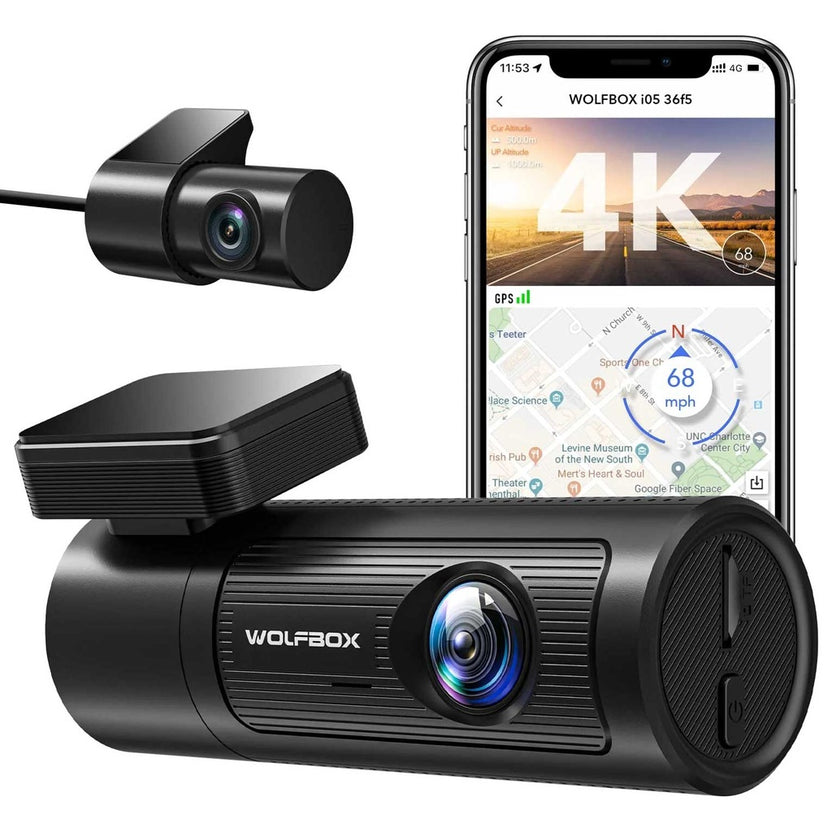
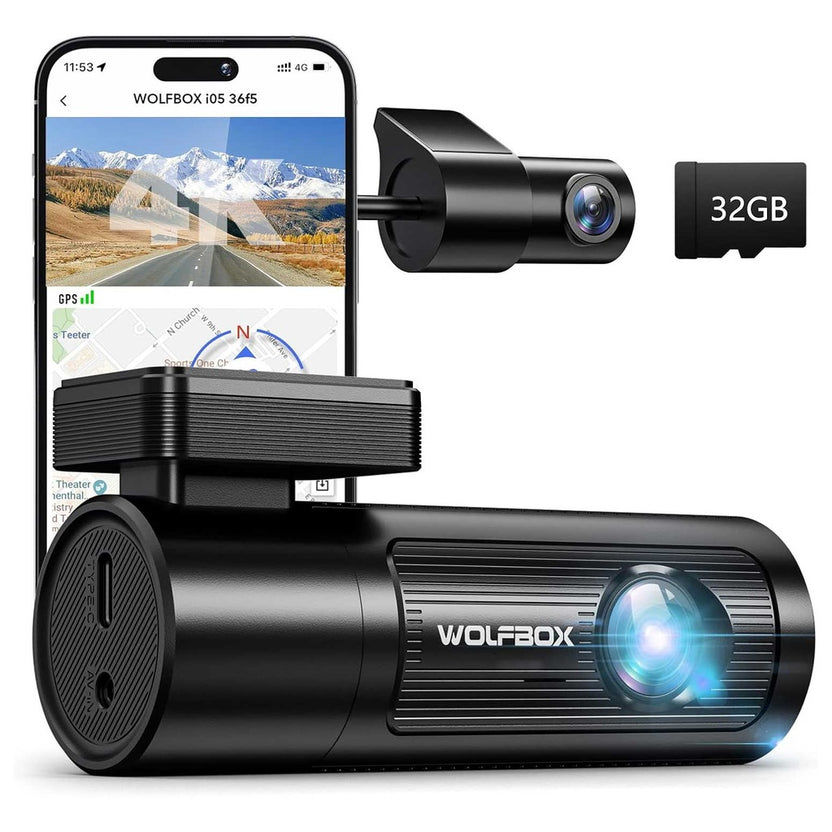
The Wolfbox i05 is a stylish, cylindrical high-end dashcam from Wolfbox that records all your journeys in the best quality. The Wolfbox i05 is equipped with Wifi, GPS and an automatic parking mode when you connect it with the optional hardwire kit. It comes with a 32GB Micro SD card so you can start recording right away.
The i05 4K Wifi GPS dashcam films with very high-quality 4K 3840p resolution at 30fps on the front and FullHD 1920p at 25fps on the back. The i05 delivers excellent performance, especially in the dark. The 8.0 Megapixel Sony Starvis sensor in this dashcam guarantees crystal clear videos.
The Wolfbox i05 is equipped with 2.4GHz Wifi. Because this dashcam is equipped with Wifi, all footage can be easily viewed on a smartphone. The Wifi has a range of about 10 meters. The Wolfbox App is available for Android and iPhone phones.
The Wolfbox i05 has a handy automatic time-lapse and vibration parking mode to secure the car while parked. In time-lapse mode, the camera takes a photo every second, which are later played back as an accelerated 30fps video. Time-lapse recordings are slightly less detailed and therefore take up less data on the SD card.
The vibration parking mode ensures that a normal video is recorded in the event of a collision or other vibration. These incidents are therefore recorded in detail.
Please note: To use parking mode, you need to connect to the Wolfbox hardwire kit. Parking mode cannot be turned on or off manually.
The i05 4K Wifi GPS dashcam comes standard with a FullHD rear camera. This rear camera is attached to the rear window of the car and records in FullHD 1080p 25fps. The rear camera is connected to the front dashcam with a long cable (6 meters). No additional power supply is needed for the camera. The images from both cameras are stored separately on the SD card. A 10-meter extension cable is available as an option.
The i05 4K Wifi GPS dashcam has a built-in GPS module. This GPS module displays the speed and also keeps track of the coordinates of the locations where the footage was filmed. This allows you to use the included software to see exactly where certain recordings were made.
This i05 comes with a 32 GB Micro SD card, good for about 6 hours of 4K + FullHD recordings. It supports Micro SD cards up to 256 GB, which means it can store about 48 hours of recordings.
The body of the i05 4K Wifi GPS dashcam can be rotated 240 degrees, ensuring that it is always pointed in the right direction on the road.
The i05 4K Wifi GPS dashcam comes with a handy 3M holder that can be attached to the windshield with the 3M double-sided sticker. The camera can be removed from the holder and replaced with a single slide. This makes it easy to remove the dashcam from the car.
This i05 4K Wifi GPS dashcam has a wide-angle lens of 170 degrees at the front and 150 degrees at the back.
The i05 4K Wifi GPS dashcam automatically starts filming when the car is started and stops filming when the car is turned off. So you no longer have to keep an eye on it when it is in the car.
The dashcam's built-in G-sensor means it will detect if you have been in an accident. In the event of an impact, images are automatically saved to a secure location so they cannot be lost. They can no longer be overwritten or deleted via the dashcam.
The i05 4K Wifi GPS dashcam has a built-in microphone so that sound is also recorded. The microphone can also be turned off if desired.
The current time and date are always displayed on the screen so that you can later prove what time the recordings in question were made.
This Wolfbox dashcam comes with a handy USB cigarette lighter plug. The plug has an extra USB port so you can still use the cigarette lighter power supply for other devices.
Found the right dashcam?
Our product finder matches you with the dashcam that suits you and your car in just a few questions.
Install your dashcam yourself?
You can often install a dashcam yourself in around 1 to 1.5 hours. A standard cigarette-lighter installation usually requires no tools.
For the best performance from your dashcam
With this 3-wire power supply, you connect the dashcam invisibly via the car's fuse box…
Replace the standard 6-metre cable with this longer 10-metre video cable.
Expand your storage further. 256GB holds around 24 hours of 4K footage.
A larger SD card lets you store more videos. 128GB holds around 12 hours of…
100Wh power bank for using parking mode without draining your car battery. Note: you need…
5.0 /5
Rating
Translated from: Dutch
| Image | |
|---|---|
The number of cameras or “channels” the dashcam uses to film. A 1-channel 1CH dashcam films only the front and a 2CH also has a rear camera. A 3CH has an additional interior camera and a 4CH dashcam often consists of four separate cameras.
|
2CH
|
Video resolution indicates how many pixels the videos consist of. Therefore, the higher the resolution, the larger the videos are and the more details can be seen. For example, 4K refers to the number of horizontal pixels (3840) of the video.
|
Full HD, 2K, and 4K
|
The quality of video at night or in low light conditions is mainly determined by the image sensor used in the dashcam. Some dashcams also have infrared LEDs, but these are mainly effective at short distances for interior cameras, for example.
|
|
Dashcams always have a round “fish eye” lens with a wide viewing angle so that a larger area around the camera is recorded. So a wider viewing angle means you capture more but also results in some distortion at the sides.
|
|
The image sensor used determines the resolution of the videos and is the biggest determinant of dashcam image quality.
|
|
The chip or processor is basically the computer or brain of the dashcam. It converts the images into digital video files (usually MP4 or AVI). Along with the image sensor, it is a major determinant of the quality of the final videos.
|
|
| Functions | |
Wifi allows you to view images on your phone or tablet within range of the camera (5 to 10 meters) without having to remove the SD card from the dashcam.
|
|
A dashcam with GPS records the current speed and location while filming. The speed can be displayed at the bottom of each video, this can be useful in determining the question of fault in an accident.
|
|
A dashcam with parking mode secures your car when it is parked. To use parking mode, the dashcam must be connected with a permanent power cable at the car's fuse box or to a Powerbank (see accessories).
|
|
In parking mode, a dashcam films in a way that consumes less data and power such as in Time lapse (1 picture per second), motion detection or vibration detection. The dashcam automatically switches to this mode when you turn off the car's ignition.
|
Vibration detection and Time lapse
|
A dashcam with Cloud allows you to watch live and receive notifications of (parking) events anywhere in the world. To use Cloud, you need a SIM card with internet connection and sometimes a (paid) user account.
|
|
Loop recording allows the dashcam to keep recording continuously with a full SD card. When the SD card is full it automatically overwrites the oldest videos so that always the last trips are stored on the SD card.
|
|
The G-sensor in a dashcam records vibrations and therefore notices when a collision or incident occurs. In that case, the current recording is stored separately and securely so that it cannot be overwritten by the Loop recording.
|
|
Advanced Driver Assistant System that can warn of dangerous situations such as a rapidly approaching predecessor or undetected lane changes. Be aware that this system is never 100% reliable and due to limited input is not always effective.
|
|
| Device | |
An LCD screen makes it easy to adjust the dashcam, operate the menu and view live and saved videos. With most dashcams, the LCD screen turns off after a few minutes of driving so it is not distracting to the driver.
|
|
A dashcam with touchscreen LCD screen you operate by using your fingers on the screen like on your smartphone. A dashcam without a touchscreen is operated with buttons.
|
|
A dashcam is mounted on the windshield with a suction cup or adhesive mount. Suction cup mounts are easier to remove but slightly less durable, while adhesive mounts are sturdier and more durable but more difficult to remove.
|
Adhesive
|
The type of plug used to power the dashcam. Can be useful if you want to switch to another model of dashcam without having to reinstall the entire power supply.
|
|
A CPL filter acts like Polaroid sunglasses in front of the lens and can prevent harmful or annoying reflections. Keep in mind that it is better to remove the CPL filter at night because otherwise the videos may become too dark.
|
|
The way videos are stored in the dashcam. Most dashcams use a Micro SD card, others have built-in eMMC memory. Preferably use a new and fast SD card from a well-known brand to avoid failures.
|
|
With a Micro SD card, the storage capacity - depending on the dashcam model - can be expanded to 128gb, 256gb or even 512gb. Up to about 24 hours of FullHD or 12 hours of 4K video can be stored on a 128gb SD card.
|
32gb, 64gb, 128gb, and 256gb
|
A microphone also records sound with the videos. Most dash cams allow you to turn off the microphone with the push of a button.
|
|
A dashcam is equipped with a Li-ion battery or capacitor (Super capacitor). The batteries are very small and only intended to be able to turn off the dashcam if the power fails. Therefore, a dashcam must always be connected to the power supply.
|
|
The voltage at which the dashcam can be used. Most dashcams are compatible with all cars and trucks with 12V and 24V. Always use the original included power supply or optional hardwire kit.
|
12V and 24V
|
|
634 g
|
|
|
|
|
| General | |
|
Wolfbox
|
|
|
€152,47 |
|
|
|
|
|
6975394263017
|
|
| Contents | |
|
|
|
Active even while your car is parked
Wolfbox i05 4K Wifi GPS 2CH 32gb dashcam€152,47
€152,47 €152,47
Order before 23:45 for same-day dispatch
Out of stock
| Image | |
|---|---|
The number of cameras or “channels” the dashcam uses to film. A 1-channel 1CH dashcam films only the front and a 2CH also has a rear camera. A 3CH has an additional interior camera and a 4CH dashcam often consists of four separate cameras.
|
2CH
|
Video resolution indicates how many pixels the videos consist of. Therefore, the higher the resolution, the larger the videos are and the more details can be seen. For example, 4K refers to the number of horizontal pixels (3840) of the video.
|
Full HD, 2K, and 4K
|
The quality of video at night or in low light conditions is mainly determined by the image sensor used in the dashcam. Some dashcams also have infrared LEDs, but these are mainly effective at short distances for interior cameras, for example.
|
|
Dashcams always have a round “fish eye” lens with a wide viewing angle so that a larger area around the camera is recorded. So a wider viewing angle means you capture more but also results in some distortion at the sides.
|
|
The image sensor used determines the resolution of the videos and is the biggest determinant of dashcam image quality.
|
|
The chip or processor is basically the computer or brain of the dashcam. It converts the images into digital video files (usually MP4 or AVI). Along with the image sensor, it is a major determinant of the quality of the final videos.
|
|
| Functions | |
Wifi allows you to view images on your phone or tablet within range of the camera (5 to 10 meters) without having to remove the SD card from the dashcam.
|
|
A dashcam with GPS records the current speed and location while filming. The speed can be displayed at the bottom of each video, this can be useful in determining the question of fault in an accident.
|
|
A dashcam with parking mode secures your car when it is parked. To use parking mode, the dashcam must be connected with a permanent power cable at the car's fuse box or to a Powerbank (see accessories).
|
|
In parking mode, a dashcam films in a way that consumes less data and power such as in Time lapse (1 picture per second), motion detection or vibration detection. The dashcam automatically switches to this mode when you turn off the car's ignition.
|
Vibration detection and Time lapse
|
A dashcam with Cloud allows you to watch live and receive notifications of (parking) events anywhere in the world. To use Cloud, you need a SIM card with internet connection and sometimes a (paid) user account.
|
|
Loop recording allows the dashcam to keep recording continuously with a full SD card. When the SD card is full it automatically overwrites the oldest videos so that always the last trips are stored on the SD card.
|
|
The G-sensor in a dashcam records vibrations and therefore notices when a collision or incident occurs. In that case, the current recording is stored separately and securely so that it cannot be overwritten by the Loop recording.
|
|
Advanced Driver Assistant System that can warn of dangerous situations such as a rapidly approaching predecessor or undetected lane changes. Be aware that this system is never 100% reliable and due to limited input is not always effective.
|
|
| Device | |
An LCD screen makes it easy to adjust the dashcam, operate the menu and view live and saved videos. With most dashcams, the LCD screen turns off after a few minutes of driving so it is not distracting to the driver.
|
|
A dashcam with touchscreen LCD screen you operate by using your fingers on the screen like on your smartphone. A dashcam without a touchscreen is operated with buttons.
|
|
A dashcam is mounted on the windshield with a suction cup or adhesive mount. Suction cup mounts are easier to remove but slightly less durable, while adhesive mounts are sturdier and more durable but more difficult to remove.
|
Adhesive
|
The type of plug used to power the dashcam. Can be useful if you want to switch to another model of dashcam without having to reinstall the entire power supply.
|
|
A CPL filter acts like Polaroid sunglasses in front of the lens and can prevent harmful or annoying reflections. Keep in mind that it is better to remove the CPL filter at night because otherwise the videos may become too dark.
|
|
The way videos are stored in the dashcam. Most dashcams use a Micro SD card, others have built-in eMMC memory. Preferably use a new and fast SD card from a well-known brand to avoid failures.
|
|
With a Micro SD card, the storage capacity - depending on the dashcam model - can be expanded to 128gb, 256gb or even 512gb. Up to about 24 hours of FullHD or 12 hours of 4K video can be stored on a 128gb SD card.
|
32gb, 64gb, 128gb, and 256gb
|
A microphone also records sound with the videos. Most dash cams allow you to turn off the microphone with the push of a button.
|
|
A dashcam is equipped with a Li-ion battery or capacitor (Super capacitor). The batteries are very small and only intended to be able to turn off the dashcam if the power fails. Therefore, a dashcam must always be connected to the power supply.
|
|
The voltage at which the dashcam can be used. Most dashcams are compatible with all cars and trucks with 12V and 24V. Always use the original included power supply or optional hardwire kit.
|
12V and 24V
|
|
634 g
| |
|
| |
| General | |
|
Wolfbox
| |
|
€152,47 | |
| Contents | |
|
| |